How to Spot a Fake Website Before You Pay
To tell a fake website from a real one, read the full address, open the company’s official channel yourself, and compare the business, the offer, and the name that will receive your money. HTTPS protects the connection, but it is not a badge of honesty, and the age of a domain is context, never proof of fraud on its own.
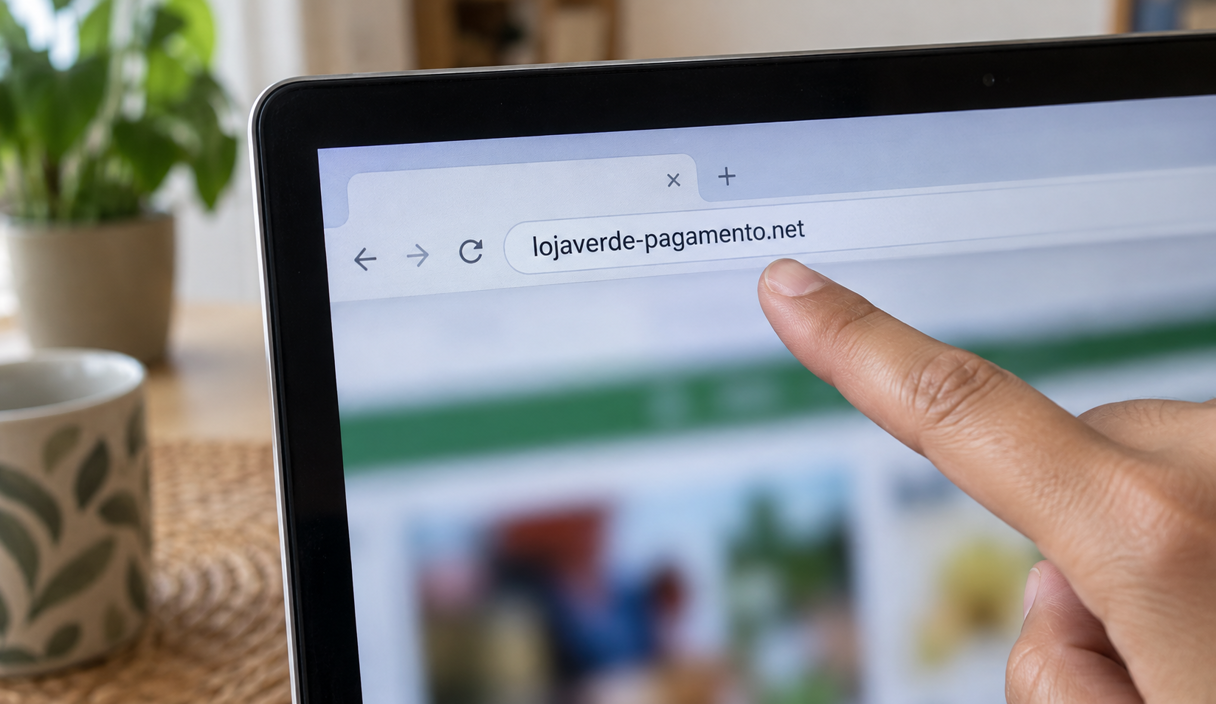
A fake page can copy the name, the photos, the product descriptions, the reviews, and the footer of a real store. A professional look tells you that someone built the page well. It does not tell you who controls the address.
Start with the registrable domain, the main part of the address tied to whoever is responsible for the site. Then check the official channel and the payment outside the page you landed on. No single sign gives you certainty, but details that do not match are reason enough to stop.
What to check in one minute
If you are about to pay, do only this:
- Read the address in the browser bar, letter by letter. Read the address, not the name printed on the page.
- Find the company’s legal name in the footer, the terms, or the privacy policy, and look it up in your state’s business registry.
- Search the store’s name with the word complaint, away from its own site.
- Check who will receive the money. Compare the name your bank or the checkout shows with the business you looked up.
If something does not line up, do not pay yet. Leave the page and find the official address yourself before going any further.
1. Read the address letter by letter
The full address deserves attention because familiar words can sit in parts of it that say nothing about who owns the domain. The Federal Trade Commission’s guidance on phishing makes the same point about links: type an address you already know instead of trusting the one you were handed.
Use this reserved example address: https://checkout.example-store.example/order. The protocol is “https://”, the full site name is “checkout.example-store.example”, the registrable domain is “example-store.example”, and the path is “/order”. The “.example” ending is reserved for examples and belongs to no real site. To check who is responsible for an address you were sent, compare the registrable domain with the official address you found yourself. Our guide to how to check if a link is safe covers the other tricks, like an at sign in the middle of an address and letters borrowed from another alphabet.
- A swapped or doubled letter. One letter too many, an “i” that became an “l”, an “m” that became “rn”.
- A word glued to the end. Something like “official”, “promo”, “usa”, or “shop” stuck onto the real name.
- A brand in the subdomain or the path. A familiar word can appear before the registrable domain, or after the site name in the path, without making the address official.
- An odd ending. Unusual endings, or a free hosting address with the brand name inside it.
Two habits carry most of this: do not open the site through the link in a message, and when in doubt, type the address yourself or go in through the app already installed on your phone.
2. Find out who is behind the business
A real store tells you who it is. Look for a legal business name, a street address, and a phone number in the footer, the terms of service, or the privacy policy. A store that sells nationwide and gives you only a contact form and a first name has left out the information you would need to reach anyone if the order went wrong.
Then look that name up. Every state keeps a public register of the businesses formed or registered there, usually run by the secretary of state, and most of them let you search it for free by company name. What you are comparing is simple: does a business by that name exist, is it in good standing, and does what it registered to do have anything to do with what is being sold to you.
Not finding a match is not proof of fraud by itself. Small businesses register under a name different from the one on the sign, and a company can be registered in one state while selling from another. What it does mean is that you still do not know who you are paying, and that is the question the rest of the checks have to answer. Our guide to how to check if a company is legitimate goes through those records in detail.
3. Check how old the site is
The public domain lookup at lookup.icann.org, run by the organization that coordinates domain names, shows when a domain was registered and when the record was last updated. Most contact details are hidden for privacy, so the useful field is usually the creation date.
A domain registered a few weeks ago deserves more care when it shows up alongside an unusual price, a contact that does not work, or a payment going somewhere unrelated. On its own, age proves nothing: new sites are launched honestly every day, and old sites get broken into.
4. Look twice at the price and the hurry
A price far below everyone else’s, paired with a deadline, is the combination worth slowing down for. Both exist to move you past the checks.
- A price outside the range: compare it with other stores instead of trusting the number in the ad.
- A deadline measured in minutes: countdown clocks, “last units left”, and the threat of losing the offer are there to stop you from looking.
- A discount tied to one payment method: if the deal only holds when you pay in a way that cannot be reversed, confirm the business and the recipient before giving up the protection a card gives you.
5. Test the contact channels
A phone number on a page is not the same as a business that answers. Find the company’s channel outside the link you were sent and ask a concrete question about the order, the shipping, or the return policy. A contact that never answers, or that only sends back canned replies, does not prove fraud, but it leaves an important question open.
Compare the phone number, the email address, and the street address with what you found in the business registry and in the store’s own pages. A company can use different email services; what matters is whether the identity, the support, and the offer tell the same story. A street address that turns out to be a parking lot or a mailbox service is worth asking about.
6. Look up the store outside its own site
Everything on the site, including the reviews displayed there, is published by the store itself. Look at sources the store does not control and compare.
- Search the store’s name together with the word complaint or scam.
- Look for a profile at the Better Business Bureau, which shows how long a business has been listed, what complaints were filed, and whether the company responded to them.
- Read reviews on platforms the store does not own, and be skeptical of a wall of five-star reviews posted within a few days of each other.
- Check the consumer alerts published by your state consumer protection office and by your state attorney general, both of which post warnings about stores that generated complaints.
You can also look up the address in Google’s Safe Browsing site status. A known warning is reason to leave. The absence of a warning is not a safety badge, because the rating reflects only what the service knows at that moment.
7. Look at the payment method
The payment method decides what you can do if something goes wrong, which is why it belongs in the decision and not at the end of it. A credit card gives you a dispute process with your issuer. A debit card gives you less room, and the protection depends on how quickly you report. An instant transfer through a payment app, a wire, a gift card, or cryptocurrency is treated as cash: once it is gone, it is usually gone. The FTC makes the same point in its guidance on shopping online.
Before you confirm, compare the name of the recipient with the business you looked up. If the payment leaves the site for a personal account, a handle, or a link sent by message, stop and confirm the charge through the official channel you found yourself.
The padlock proves nothing
HTTPS protects the connection between your browser and the site, but it does not prove the store is honest. Google’s help page on checking whether a site’s connection is secure also tells you to read the site name before entering anything. Treat HTTPS as a technical requirement, not a commercial seal.
In Chrome the padlock is not even there anymore: since version 117, released in September 2023, the address bar shows a settings icon instead. The Chromium team explained that many people read the padlock as a sign of a trustworthy site, when almost every phishing site, meaning a fake site built to take your details, uses HTTPS too.
How to tell whether a site is safe to buy from
There is no single badge that tells you a site is safe to buy from. What works is adding up the signs above and finishing with two lookups done away from the store’s own pages.
- The Better Business Bureau profile: it shows how long the business has been in the file, the complaints filed against it, and whether the company answered them. Many unanswered complaints are a reason for care. An empty profile proves nothing, because a store set up a few days ago has no history yet, and a site imitating a well-known retailer is borrowing that retailer’s reputation.
- Your state’s consumer protection office: the offices listed at usa.gov take complaints and publish alerts. If you already lost money, the report itself goes to the FTC at ReportFraud.ftc.gov, which is where federal fraud reports are collected and shared with law enforcement.
These lookups show you a company’s history. They do not deliver a verdict on it. Use the result alongside the address, the business registration, and the name on the payment.
An example: the sneaker sale
An example
Renee sees an ad for running shoes at less than half price, with another ten percent off if she pays by transfer, and a clock saying the offer ends in 15 minutes. The site has the photos and the footer of a store she knows. Before paying, she runs the one-minute check.
- The address. The browser bar reads runexample-outlet.example, and the store she knows lives at runexample.example. The word “outlet” glued to the name is already reason to stop.
- The business. The footer shows a company name, but the state registry has no business under it, and the street address matches a mailbox service.
- Outside the site. Searching the name with the word complaint, she finds recent posts from people who paid and received nothing.
- The recipient. On the confirmation screen, the money would go to a person, not to the store.
No single one of those would have proven a scam. Together they show that the page is not the store Renee knows. She closes the ad, types the real store’s address, and finds the same shoes at the normal price.
If you already paid
Contact your bank as soon as you notice the problem. The person at fault is whoever built the fake site, not you.
- In the first hour, call your card issuer or bank. Use the number on the back of your card. If you paid by credit card, ask to dispute the charge; the FTC’s guidance on disputing credit card charges explains the process and why writing to the issuer protects your rights. If you paid by debit card, say so immediately, because the limits on a debit card depend on how fast you report.
- If you sent an instant payment or a wire, call the bank right away and say it was fraud. Recovery is uncertain and depends on speed. The steps are in our guide to what to do after an instant payment scam.
- Keep everything. The site address, the receipt, the messages, and the product page, screenshotted before the site disappears.
- Report it. File at ReportFraud.ftc.gov and, if you lost money, at the FBI’s Internet Crime Complaint Center. A police report is also worth filing, because banks and insurers often ask for one.
- Watch the account. Card details entered on a fake checkout tend to be tested with a small charge before a large one.
If it just happened
The full order to report in is in our guide to how to report a scam. If you are in immediate physical danger, call 911.
Fake website FAQ
How can I tell whether a website is trustworthy in a few seconds?
Read the registrable domain, find the official channel yourself, look the business up, and compare the name that will receive the payment. If those do not match, do not go on until you understand the difference.
Does the padlock in the browser mean the site is safe?
No. HTTPS protects the connection between your browser and the page, but it does not prove the store is honest. In Chrome the padlock was replaced by a settings icon in version 117. Check the domain, the business, the official channel, the offer, and the recipient of the payment as well.
Does a registered business name guarantee the store is real?
A registration confirms that a business by that name exists on file in that state. It does not confirm that the website belongs to that business, or that the offer is honest. Compare the legal name, the registered activity, the address, the contact, and the payment recipient before you decide.
I bought something and the site disappeared. Can I get the money back?
Call your bank or card issuer right away through the official number and explain what happened. On a credit card, ask to dispute the charge. On a debit card or an instant transfer, say it was fraud and ask what can still be done, because the options narrow quickly. Keep the receipt, the address, and the messages. Recovery is never guaranteed, and anyone promising to get your money back for a fee is running a second scam.
Is a store advertised on social media riskier?
An ad proves nothing either way. If the offer interests you, leave the ad, find the official address yourself, and compare the business, the offer, and the payment before going on.
Sources
The lookups and rules cited above were checked on September 22, 2026 on these pages:
- Federal Trade Commission: shopping online
- Federal Trade Commission: how to recognize and avoid phishing scams
- Federal Trade Commission: disputing credit card charges
- Federal Trade Commission: lost or stolen credit, ATM, and debit cards
- ICANN: domain name registration lookup
- Google: Safe Browsing site status
- Chrome Help: check if a site’s connection is secure
- Chromium blog: the padlock replaced by a settings icon
- Better Business Bureau
- USA.gov: state consumer protection offices and state attorneys general
- ReportFraud.ftc.gov and the FBI Internet Crime Complaint Center
Keep reading

Online Shopping Scams: How to Check a Store Before You Buy
The checks that expose a fake store in a few minutes, and the payment method that protects a purchase.
11 min readRead
Marketplace Scams: How to Buy and Sell Without Losing Money
The overpayment, the off-platform payment, and the meeting rules that protect a private sale.
11 min readRead
How to Dispute a Credit Card Charge: Steps, Deadlines, and Evidence
The difference between an error and a fraudulent charge, the written notice, the deadline, and what to keep.
11 min readRead